
RPF 1.4.7/RPT 1.3.4
Arm Rotation
Vanilla Rotations
You can set the arm rotation for an item the player is holding! This is done by "wrapping" your model in an rpt:arm_transform model:
json
{
    "model": {
        "type": "rpt:arm_transform",
        "transform": "item",
        "model": {
            "type": "model",
            "model": "item/diamond_pickaxe"
        }
    }
}
In the example above, we specified the arm rotation used in the vanilla game when a player holds an item. Below is a list of vanilla rotations:
empty- player is holding nothingitem- player is holding an item that doesn't trigger rotations belowblock- player is raising a shieldbow_and_arrow- player is drawing a bowstringthrow_trident- player is winding up a trident throwcrossbow_charge- player is charging a crossbowcrossbow_hold- player is holding a charged crossbowspyglass- player is looking through a spyglasstoot_horn- player is blowing a goat hornbrush- player is using a brushspear- player is using a spear as a kinetic weapon (For 1.21.1 and higher)
In addition to vanilla rotations, you can define your own or modify some settings of vanilla ones:
Creating a Custom Rotation
json
{
    "model": {
        "type": "rpt:arm_transform",
        "transform": {
            // rotation along axes
            "x": 0,
            "y": 0,
            "z": 0,
            "bob": true, // whether to apply "breathing" animation
            "swing": true, // whether to apply arm swinging animation when walking
            "attack": true, // whether to apply attack animation
            "type": "item" // type of animation from vanilla
        },
        "opposite" : { ... }, // Transformations for the opposite arm, if another item with rpt:arm_transform doesn't override it
        "model": { ... }
    }
}
Note
If you specify type in the record above, rotations along the axes will NOT be applied!
In addition to numbers, axes support expressions (see Mathematical Expressions for more details):
json
{
    "model": {
        "type": "rpt:arm_transform",
        "transform": {
            "x": "sin(time*0.75) * 45 - 90", // Player will swing their arm in front of their face
            "swing": false
        },
        "model": {
            "type": "model",
            "model": "item/bell"
        }
    }
}
RPT also provides some variables that can be used:
time- game time in tickshx/hy/hz- head rotation along axesuseArm- the arm using the item: 1 if main, -1 if offhandswingArm- the arm performing the hit: 1 if right, -1 if leftuseTick- how many ticks the item has been in useholdArm- the arm holding the item: 1 if right, -1 if left
Please Note
Variables mentioned in Mathematical Expressions will not work in rpt:arm_transform!
Simple Example:
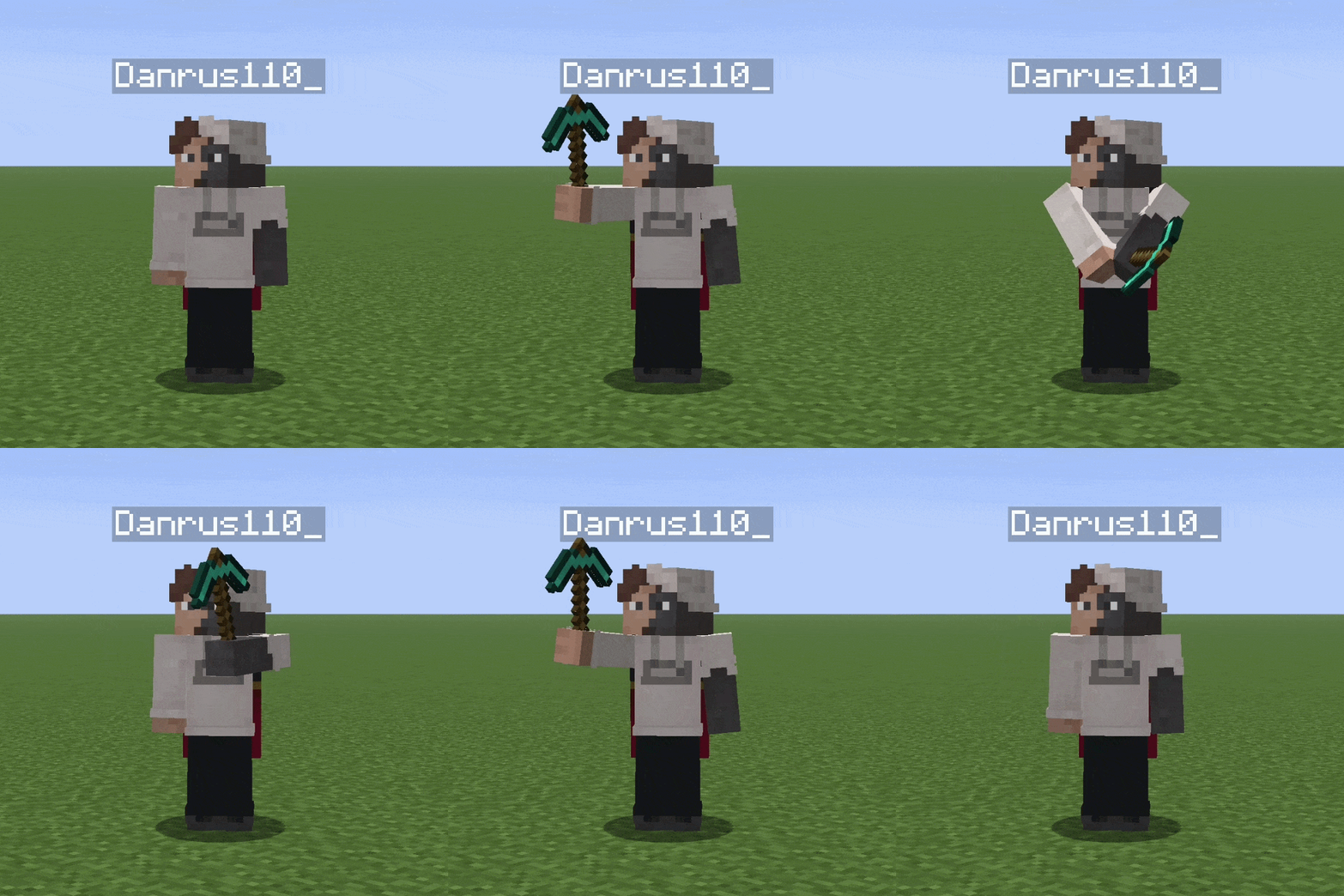
json
{
    "model": {
        "type": "rpt:arm_transform",
        "transform": {
            "x": "hx - 90",
            "y": "hy",
            "swing": false
        },
        "model": {
            "type": "model",
            "model": "item/diamond_pickaxe"
        }
    }
}